M MikeSullyTools
Operating guide

Campaign Studio Usage Guide

Use Campaign Studio to draft and organize campaign direction from a prepared brief. It helps with structure, copy options, launch tasks, image prompts, and optional visual drafts, while the owner still approves strategy, budget, publishing, and claims.

DraftsOrganized campaign packs for review.
ControlsCredits and image count before each run.
ApprovalOwner decides claims, budget, and launch.

When To Use Campaign Studio

Use Campaign Studio when you already have a real business goal and need a cleaner first draft of the campaign plan. It is most useful when the owner can provide context and make final decisions.

Decision guide
New offer or promotionTurn the offer, audience, deadline, and proof points into a campaign angle, copy options, and launch tasks.
Stalled marketing notesConvert scattered ideas into a working plan that can be reviewed, edited, and assigned.
Channel adaptationDraft versions for landing pages, email, LinkedIn, Google Ads, or social posts without starting each channel from scratch.
Visual directionCreate prompts and optional image drafts for a hero, ad, email header, or social concept before production work begins.
Small test campaignPrepare a controlled first pass before committing more budget or expanding the audience.
Owner handoffGive the owner a structured review package instead of a loose brainstorm or long chat transcript.
Do not use Campaign Studio as the final authority for legal claims, regulated categories, budgets, platform policy, pricing accuracy, testimonials, or performance promises.

What To Prepare Before Using It

The output is only as useful as the brief. Prepare the commercial facts before you spend credits, especially when you plan to generate image drafts.

Brief checklist
ObjectivePick one primary action: signup, credit purchase, form submission, booking, product page visit, or reply.
AudienceName the buyer, their situation, the problem they feel, and what would make them trust the offer.
OfferDefine what is being promoted, the incentive or reason to act now, and any dates or limits.
ProofList real features, benefits, examples, guarantees, testimonials, pricing, and constraints that are safe to mention.
BoundariesInclude claims to avoid, brand tone rules, compliance notes, competitor names to skip, and unsupported promises.
ChannelsChoose only the channels you can actually publish and monitor. A focused channel list produces better copy.
BudgetSet the campaign budget and credit budget before the run so the draft does not push work you cannot execute.
Visual needSay whether the image is for a landing page hero, paid ad, email header, social post, or internal concept review.
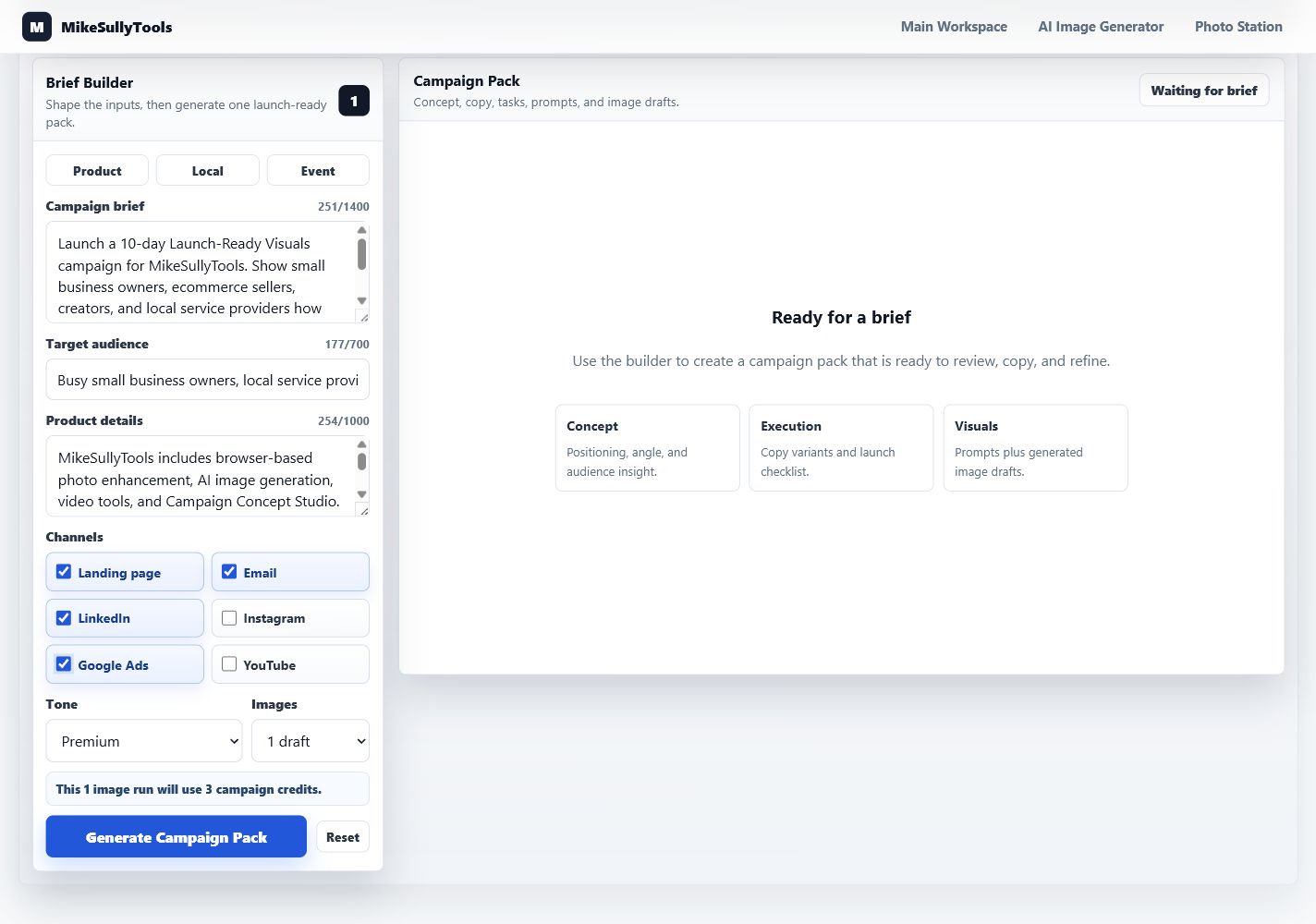
Campaign: 10-day launch push for MikeSullyTools.
Owner goal: drive trial users or credit purchases, not broad brand awareness.
Audience: busy small business owners, ecommerce sellers, creators, and local service providers.
Offer: browser-based photo cleanup, video cleanup, AI image generation, and campaign drafting tools.
Proof to use: fast browser workflow, draft assets before launch, OpenAI key stays server-side.
Do not claim: guaranteed sales, fully automated marketing, or hands-off publishing.
Channels: landing page, email, LinkedIn, and Google Ads.
Visual need: practical small-business workspace hero direction with no fake metrics.
Best first run: use text-only until the offer, audience, and primary call to action are stable. Add one image draft only after the campaign direction is worth visualizing.

Step-By-Step Workflow

Run the tool like a controlled campaign drafting process. Keep the first pass narrow, review the output, then decide whether another run is justified.

Operating steps
1Choose one objectiveDecide the one action the campaign should create before writing any copy.
2Build the briefEnter the offer, audience, proof, constraints, channels, and visual need in plain language.
3Start narrowUse one audience slice and a short channel list. Expand only after the first draft is useful.
4Confirm creditsChoose text-only for positioning work, or one image when a visual direction is needed.
5Generate one packRun one controlled pass. Avoid repeated runs until you understand what needs to change.
6Read concept firstCheck whether the strategic angle, audience, and CTA match the real business goal.
7Edit for channelsMove the strongest copy into the landing page, email, ad, or social draft and adjust for each platform.
8Approve or reviseOwner reviews facts, claims, spend, links, visuals, and publishing timing before launch.
9Iterate with one changeIf another run is needed, change one thing: audience, offer, CTA, channel, or image direction.
A good first pass should make the next owner decision easier: approve the direction, revise the brief, or stop before spending more credits.

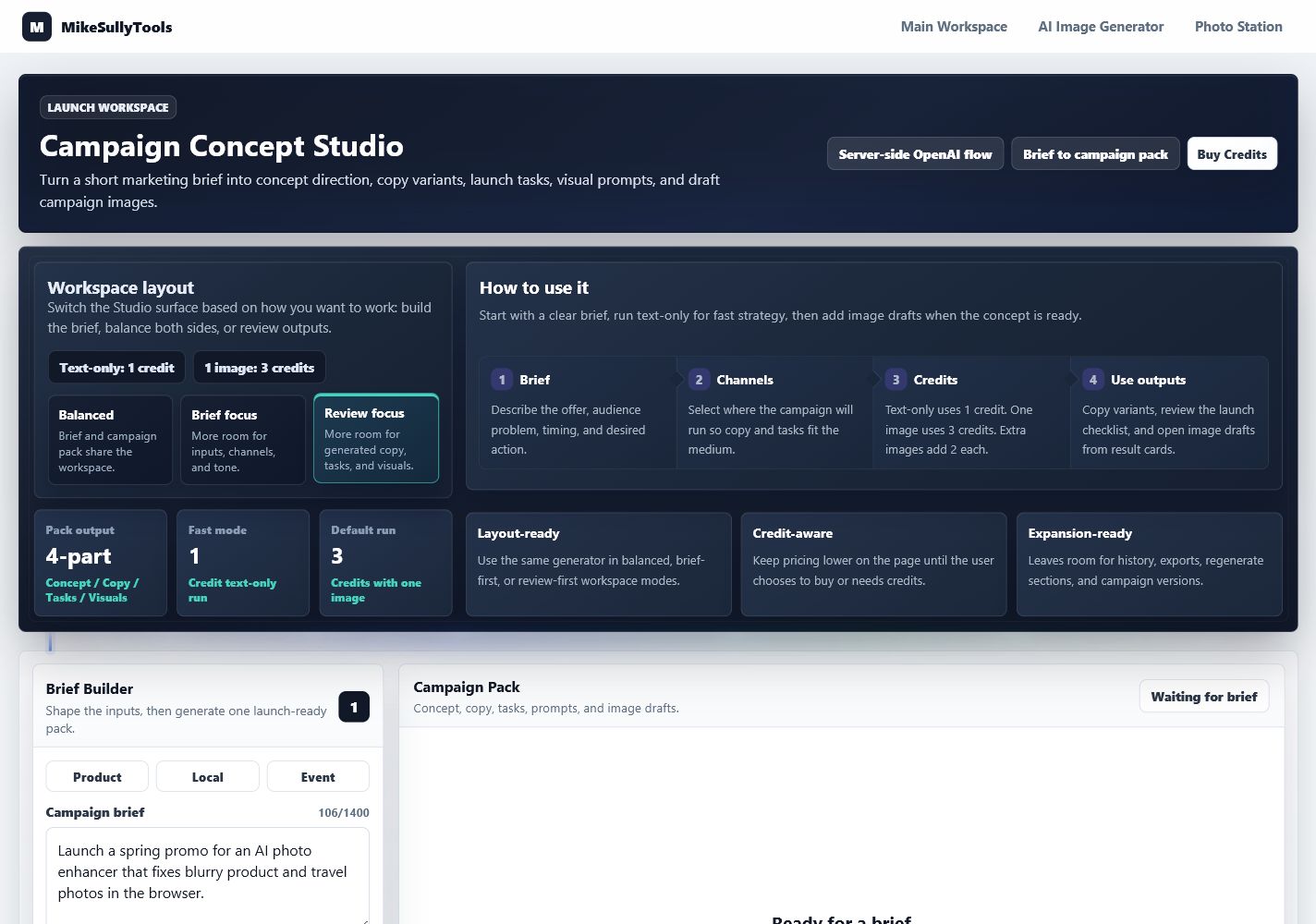
Screen checkpoint: control room

Start in the Studio control room. Use Balanced mode for normal work, Brief focus while still shaping inputs, and Review focus after a pack has been generated.

  • Confirm the credit rules before the run.
  • Keep the first pass to one objective and one audience segment.
  • Use the layout mode to reduce clutter while working.
Campaign Studio control room and layout mode controls
The control room is useful as a workflow map, not as the hero image for the guide.

Screen checkpoint: brief builder

The brief builder is where quality is won or lost. Specific business facts reduce generic copy and lower the chance of invented claims.

  • Write the offer and CTA in the same language the owner would approve.
  • Add proof points and forbidden claims before generating.
  • Only request image drafts when the visual direction matters.
Brief Builder filled with campaign launch details
A specific brief produces cleaner strategy, tighter copy, and more useful prompt direction.

What The Output Means

A campaign pack is a working draft. Each part has a different job, and none of it should be published without owner review.

Output map
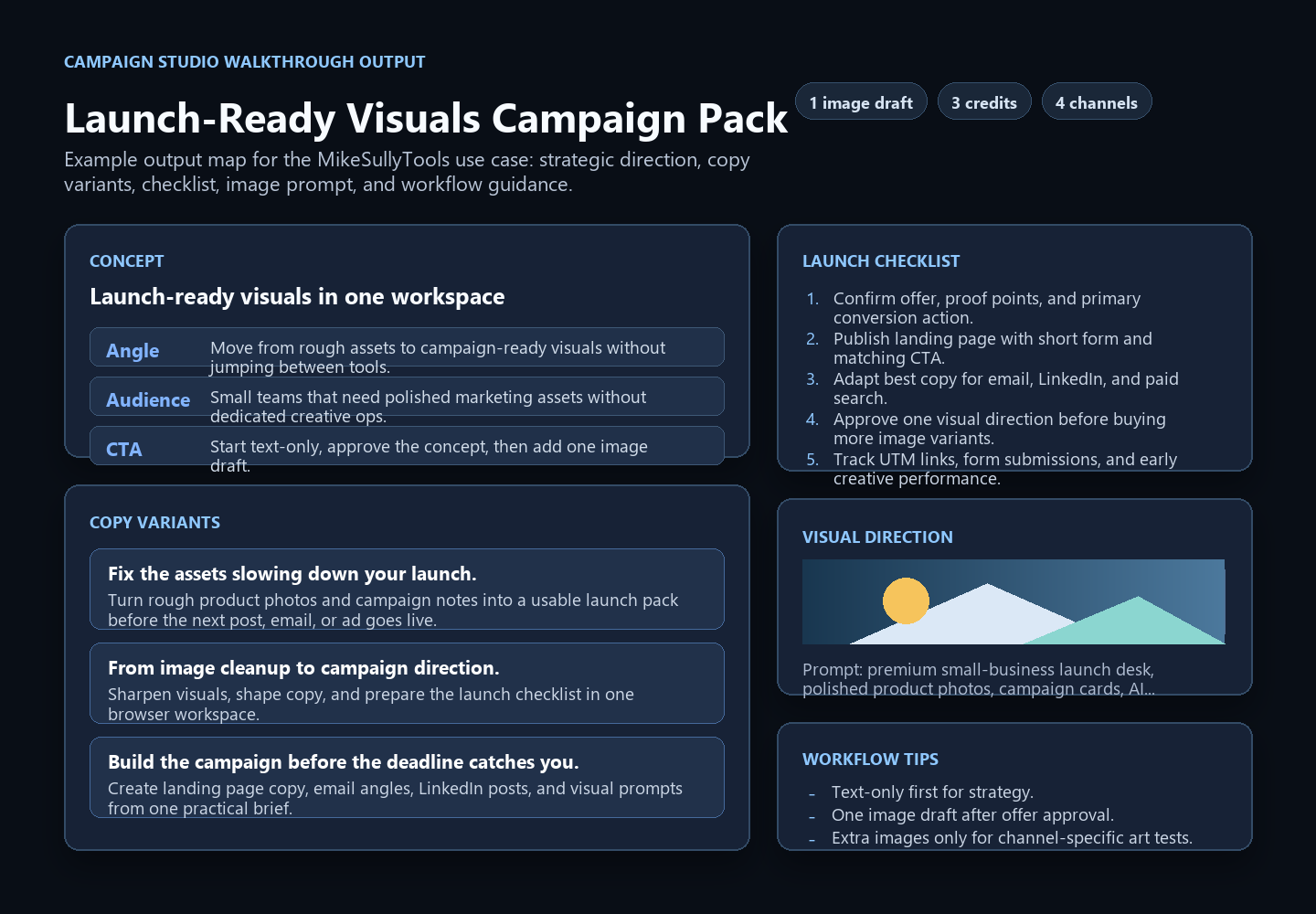
Campaign conceptThe proposed angle for the campaign. Use it to decide whether the direction is worth editing, not as automatic strategy approval.
Audience insightA working hypothesis about buyer motivation. Validate it against what you know from customers, sales calls, reviews, or analytics.
Copy variantsDraft headlines, body copy, and CTAs. Edit them for brand voice, truthfulness, platform limits, and landing page fit.
Launch checklistA planning list for owner, creative, tracking, publishing, and review tasks. Assign owners and deadlines before launch.
Image promptsReusable art direction for a generated visual, designer brief, ad concept, email header, or landing page hero.
Image draftsOptional visual drafts served through the backend preview route. Check accuracy, legibility, brand fit, and any text in the image.

Review the campaign pack in order

Read strategy before copy. Then review tasks, prompts, and images. If the strategic angle is wrong, revise the brief before polishing details.

  • Use the strongest copy variant as a draft, not final text.
  • Use the checklist as a QA and assignment list.
  • Use the image prompt even when the generated image needs revision.
Example output map for a generated Campaign Studio campaign pack
The output is separated into strategy, copy, checklist, visual direction, and workflow notes.

What Still Needs Human Review

Campaign Studio can organize the draft, but the owner remains responsible for business judgment and publishing decisions.

Owner approval gate
StrategyConfirm the offer, positioning, audience, channel mix, and timing match the business goal.
BudgetApprove ad spend, campaign credits, production costs, discount levels, and test limits before launch.
ClaimsCheck every performance, pricing, guarantee, testimonial, safety, and comparison claim before publishing.
Brand voiceEdit copy so it sounds like the business and fits the level of confidence the owner wants to project.
Publishing setupConfirm landing pages, forms, checkout links, UTMs, pixels, email lists, and platform settings.
Visual accuracyReview generated images for distorted products, unreadable text, off-brand details, fake UI, or misleading scenes.
Owner approval is required before spending money, publishing copy, using customer claims, running ads, sending email, or presenting generated visuals as finished brand assets.

Common Mistakes

Most weak results come from vague inputs, asking for too much in one pass, or skipping the review step.

Avoid these
Starting with a vague brief"Make a campaign for my business" usually produces generic copy. Add the offer, audience, proof, and CTA.
Choosing every channelToo many channels weakens the draft. Pick the channels that will actually be launched and measured.
Generating images too earlyVisual drafts cost more credits. Wait until the owner is comfortable with the offer and direction.
Publishing without editsThe output is a draft. Edit for truth, tone, platform rules, landing page fit, and customer context.
Changing too many inputsIf the first output is close, revise one variable at a time so you know what improved the result.
Ignoring trackingPrepare UTMs, conversion events, forms, checkout links, and reporting before launch day.

Best Use Cases

The tool is strongest when the campaign has a clear owner, a concrete offer, and a practical next step.

Where it fits
Local service promotionDraft a seasonal offer, landing page copy, email, social post, and review checklist for a focused service area.
Ecommerce product pushPrepare product benefit angles, ad copy, email copy, visual prompts, and a launch QA list.
Creator or course launchOrganize the promise, audience objections, content hooks, email sequence angles, and social post drafts.
Tool or SaaS feature launchTranslate feature details into buyer outcomes, campaign copy, demo prompts, and channel-specific tasks.
Retargeting refreshCreate new copy variants for a known audience when the offer is already proven but creative is stale.
Internal campaign briefGive a designer, writer, or owner a structured starting point before production starts.

Credits And Checkout

Campaign Studio charges credits by run type. Checkout is handled by Stripe, and credits stay linked to the browser client id used at purchase.

Pricing rules
Starter
$9
10 credits for quick drafts and small campaign tests.
Growth
$19
30 credits for repeated launch planning and image drafts.
Pro
$39
75 credits for larger content batches and deeper creative review.
  • Text-only campaign pack: 1 credit.
  • One image draft: 3 credits.
  • Each additional image draft: 2 credits.
  • If credits do not appear after checkout, return in the same browser first.
  • Do not buy more credits until the owner understands the next test or revision goal.

Troubleshooting

Most problems fall into brief quality, credits, checkout configuration, backend configuration, or generation timeouts.

Support notes
Weak or generic outputAdd a narrower audience, sharper offer, proof points, timing, channel details, and a clearer call to action.
Not enough creditsBuy a pack or reduce the image count. Text-only uses the fewest credits.
Checkout does not openConfirm Stripe is configured on the server and retry from the same browser session.
Studio not configuredConfirm the backend has OPENAI_API_KEY loaded and /health reports openai_image_edit_configured: true.
Generation times outTry text-only first or reduce image count. Image generation can take longer than text generation.
Missing image draftsThe campaign text can still be used. Image generation may fail independently of text output.

Validation Notes

On June 10, 2026, the MikeSullyTools lead-campaign walkthrough was validated against the live Campaign Studio backend with one generated image.

Validated June 10, 2026
  • The live run returned a campaign pack.
  • The run charged 3 campaign credits.
  • The generated visual was served through the backend preview route as image/png.
  • The browser never receives or handles OPENAI_API_KEY. The backend calls OpenAI server-side.

Reference Links

Use these external references when reviewing ad creative, lead-generation work, channel fit, and campaign measurement.

Further reading